
A calmer, safer web — for the people you love.
Searchly is a free web browser that protects older and less confident people from online scams — and lets them ask a family member for help with a single tap.
Free forever · Windows 10 & 11 · No account needed
The web became a minefield for the people who need it most.
Every day, older people are targeted by fake virus warnings, bank text scams, prize cons and lookalike websites. One wrong click can cost a lifetime's savings — and leave a family shaken.
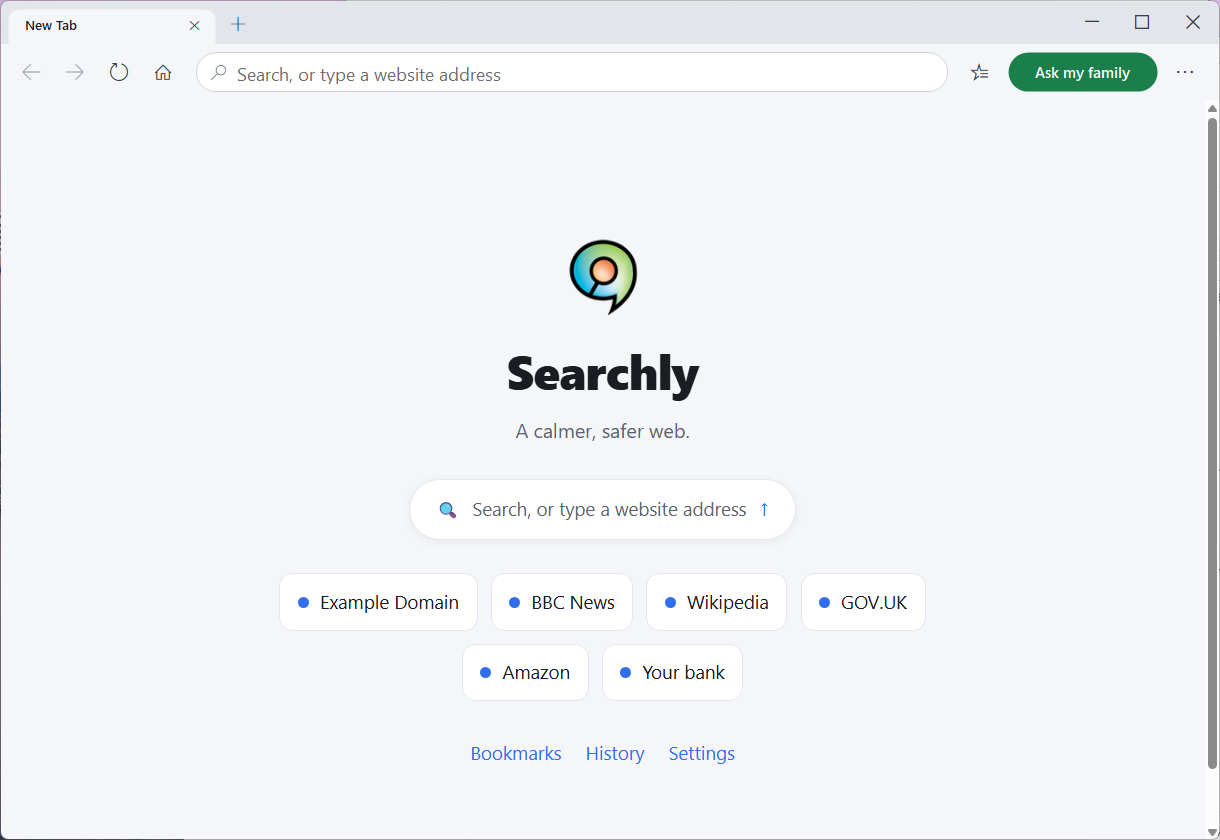
Searchly turns the danger down without taking anyone's independence away. It looks and works like a normal browser — just calmer, larger, and quietly watching your back.
Simplify, don't stupidify.
Searchly isn't a walled garden or a toy. It's a real, modern browser built on the same engine as Edge and Chrome, so every website works exactly as it should. We've simply turned the clutter and the danger down — and added a safety net that reaches the whole family.
Protection that feels like kindness, not a lecture.
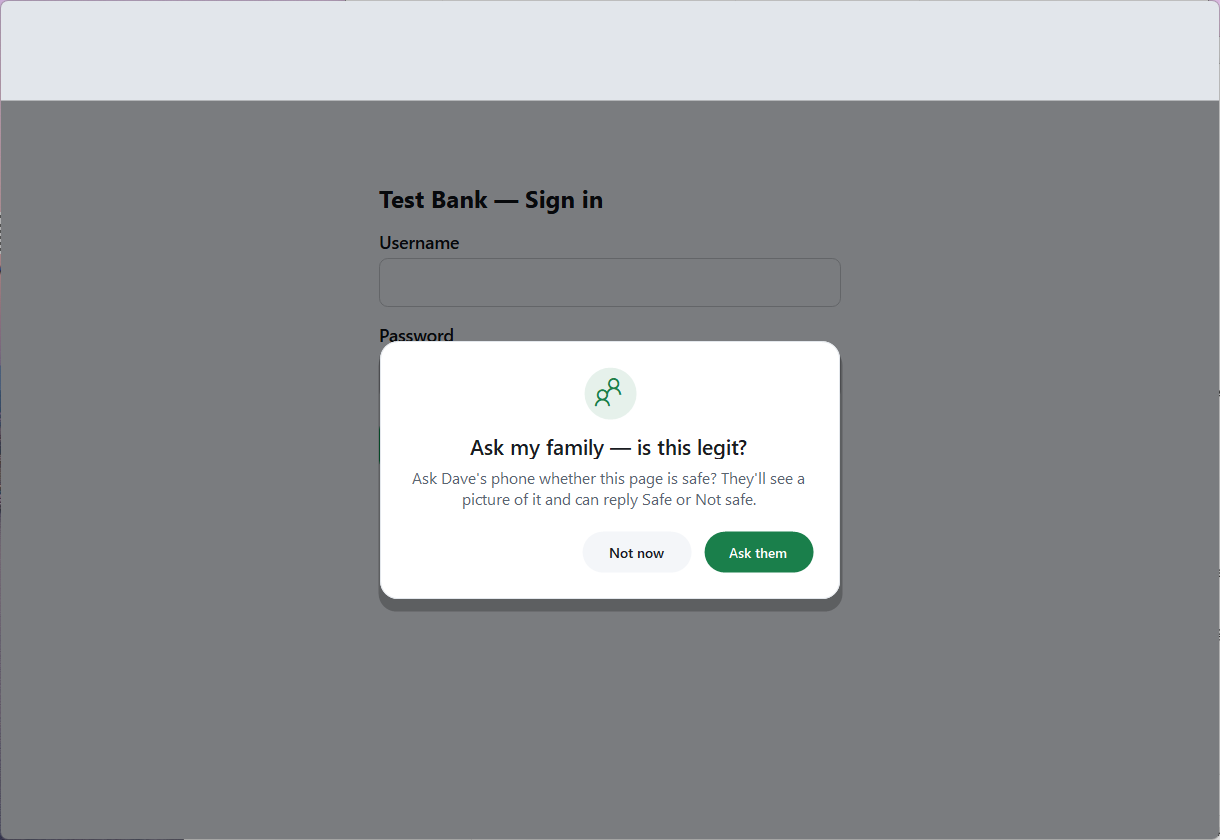
"Ask my family" — help is one tap away
When something looks dodgy, there's one green button. Tap it and Searchly sends the page to a family member's phone. They see a picture of it and simply reply Safe or Not safe — no app to install, no need to touch the computer.
- A second pair of eyes, straight from your phone.
- The page greys out while you wait, so no one can be rushed into acting.
- If they say it's not safe, Searchly closes the page to keep you protected.
- Works over Telegram or email — set up once, with a guided wizard.
Scams don't stand a chance
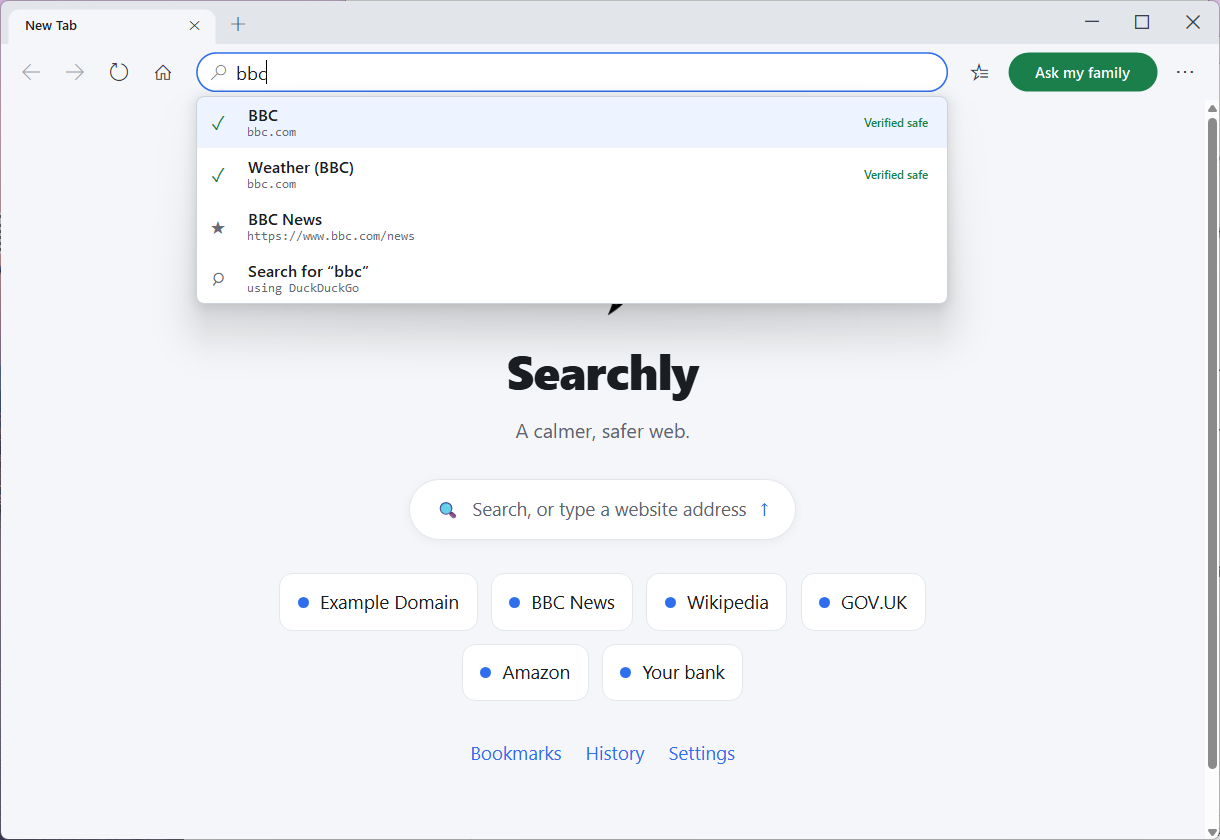
Searchly warns about known scam and phishing sites, and catches scam-looking pages — fake virus alerts, gift-card demands, prize cons — even brand-new ones the blocklists haven't seen yet.
- Green "This really is…" badges confirm you're on the genuine bank or government site.
- The smart address bar surfaces the real site first and flags lookalike, typo domains.
- A gentle safety check before you type any password on an unfamiliar site.
- Warm, plain-English warnings — never scary technical error messages.
Bank logins that ask permission
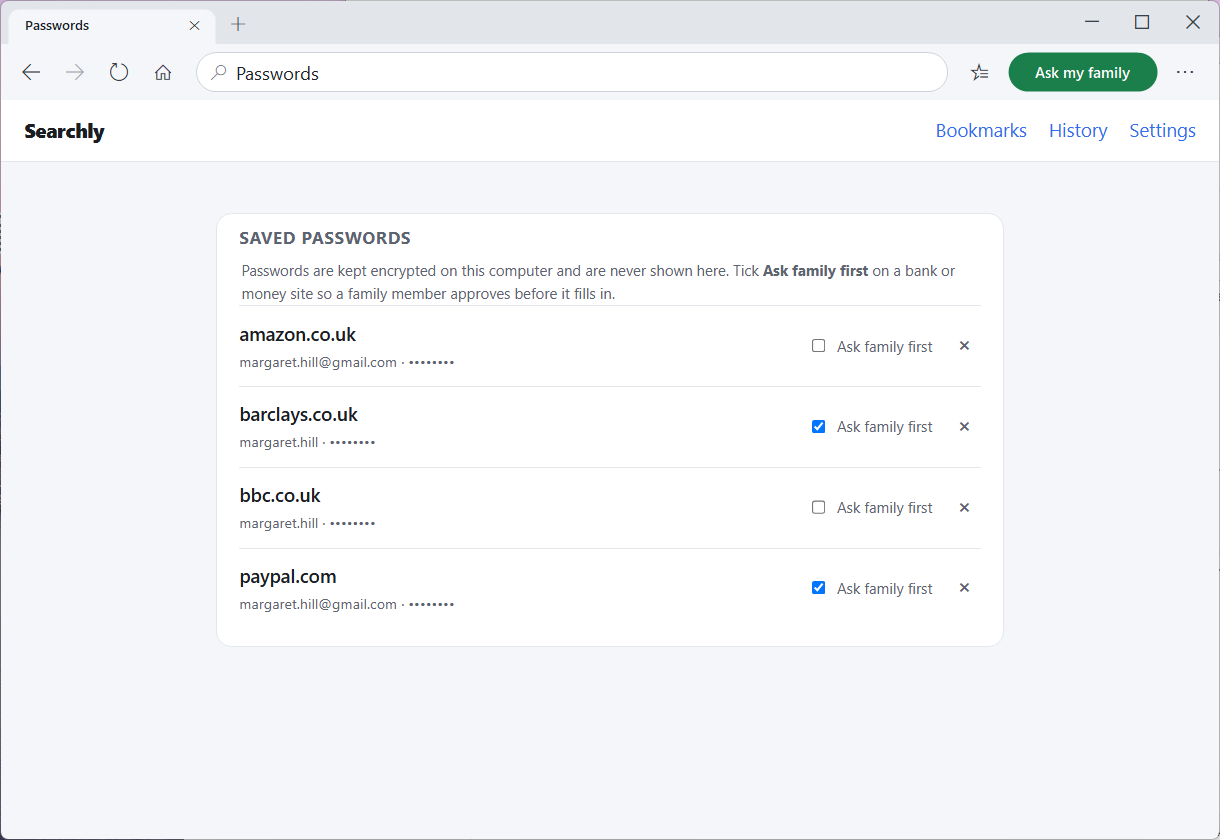
Everyday logins just work. But money sites — your bank, PayPal — are automatically flagged "Ask family first." Before such a login fills in, a family member approves it with one tap on their phone.
- Passwords are encrypted on the computer and never shown to anyone — not even you.
- Family approve the action, and never see the password itself.
- No family set up? A private family PIN unlocks it instead.
- You can re-classify any saved login yourself, any time.
No sneaking around Searchly
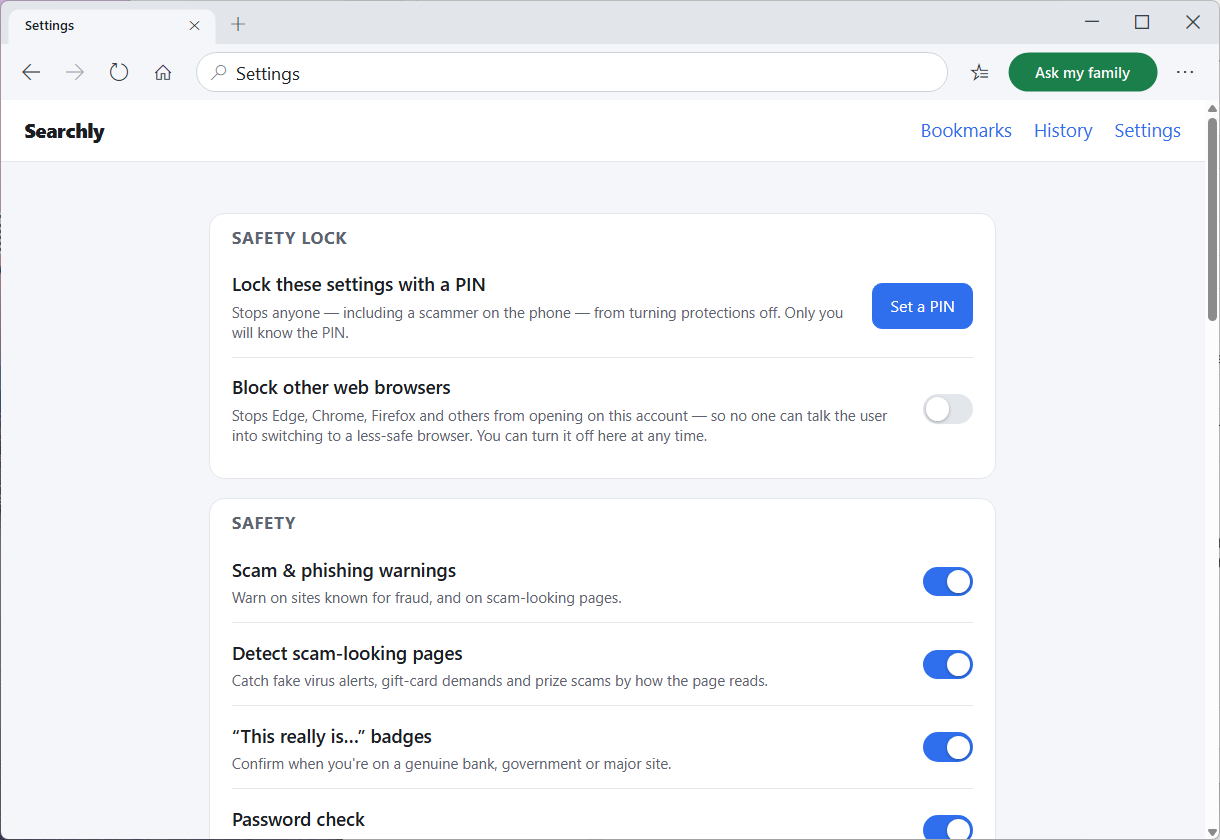
A scammer's favourite trick is "just open Chrome instead." Searchly can block every other browser on the account — so the safety net can't be side-stepped, and there's nothing for a stranger on the phone to talk your loved one into.
- Stops Edge, Chrome, Firefox and others opening on this account.
- Closes the obvious loophole scammers use to dodge Searchly's protections.
- Locked behind the caregiver PIN, so it can't be switched off under pressure.
- You're always in control — turn it off yourself, here, at any time.
Built to feel calm
Bigger text out of the box. A single, uncluttered toolbar. No pop-up chaos and no jargon. Even the warnings are soft, friendly cards — not harsh system dialogs.
- Gentle default zoom, with one-tap make-text-bigger.
- Reader mode strips articles down to clean, large, readable text.
- Familiar favourites, history and downloads — all in the same calm style.
- A friendly start page with large, clearly labelled shortcuts.
A safety net the whole family can hold.
Tap the green button
On any page that feels off, your loved one taps "Ask my family" — or Searchly offers it automatically before a risky login.
You get it on your phone
You receive a picture of the exact page by Telegram or email, and simply tap Safe or Not safe. No app to install.
Searchly acts on your reply
The browser brings them back and either re-enables the page or gently closes it — so a scammer never gets a second chance.
Peace of mind — without taking over.
You set Searchly up in a few minutes, choose who gets the "Ask my family" messages, and lock the safety settings with a PIN. Then you can stop being on call 24/7. It's a safety net, not surveillance — you're only pulled in when it matters.
Set up in minutes
Install, pair a phone with the guided wizard, and you're done. No servers, no technical jargon.
Stay in the loop
You're notified only when your loved one asks, or before a bank login — not for everything they do.
A scammer can't switch it off
A caregiver PIN locks the safety settings, so no one on the phone can talk your parent into turning protections off.
Free. Private. Yours.
On the device
Passwords are encrypted on the computer with Windows DPAPI and never leave it.
No account
Nothing to sign up for. No profile to build. Just download and go.
Private search
Private search by DuckDuckGo is the default — no tracking profile follows you around.
Always current
Searchly updates itself quietly in the background, so protections keep improving on their own.
Give someone you love a calmer, safer web.
Free for Windows 10 and 11. No account, no catch. Set it up in a few minutes and finally stop worrying.